Sitemaps and Robots.txt: A 5-Minute Check

Two small text files quietly govern how search engines treat your entire site. The sitemap lists every page you want found; robots.txt sets the rules for what crawlers may read. Most owners have never opened either, which is usually fine, until a redesign ships a robots file that blocks the whole site, or a sitemap keeps advertising pages deleted a year ago. Errors here are silent: nothing looks broken to a visitor while your pages fall out of the index. This guide is the five-minute check: where the files live, what healthy ones look like, and the mistakes worth fixing today.
While writing this post, we ran the exact check we are about to teach you on our own site. We typed storypress.app/sitemap.xml into a browser. The file loaded fine, status 200, valid XML. It contained zero pages. Fifteen blog posts live, and the map we hand to Google listed none of them. We filed the fix the same day.
That is the whole point of this guide. Sitemaps and robots.txt are two small text files that quietly decide how easily search engines (and now AI assistants) find your pages. Most site owners have never looked at either one. Both take under five minutes to check, and the failure modes are silent: nothing looks broken, your site works perfectly for humans, and you only notice when pages stop showing up in search.
One is a map. One is a gatekeeper.
sitemap.xml is a list of every page you want search engines to know about, usually with a date showing when each was last updated. Think of it as handing a visitor a map of your shop: here are the aisles, here is what is new. Google calls it a discovery signal, not a command, but for small sites with few backlinks it is often how new pages get found at all. Google's own sitemap documentation says small, well-linked sites can survive without one. In practice, a correct sitemap means new pages get discovered in days instead of weeks.
robots.txt is the opposite: it tells crawlers where they may not go. It lives at yourdomain.com/robots.txt and follows a simple allow/disallow format. It is a gatekeeper, not a lock. Well-behaved bots respect it; it provides zero security. Never use it to hide private pages, because listing a path in robots.txt literally publishes that path to anyone curious enough to look.
Side by side: which file does what
| sitemap.xml | robots.txt | |
|---|---|---|
| Job | Lists pages you WANT found | Marks paths crawlers should SKIP |
| Lives at | /sitemap.xml | /robots.txt (root only) |
| Tone | “Here is my best stuff” | “Please stay out of here” |
| If missing | Slower discovery of new pages | Everything is crawlable (usually fine) |
| If wrong | Google ignores it or wastes crawls | Can hide your ENTIRE site from search |
| Is it security? | No | No. It is a polite request, not a lock |
What these files look like in your browser
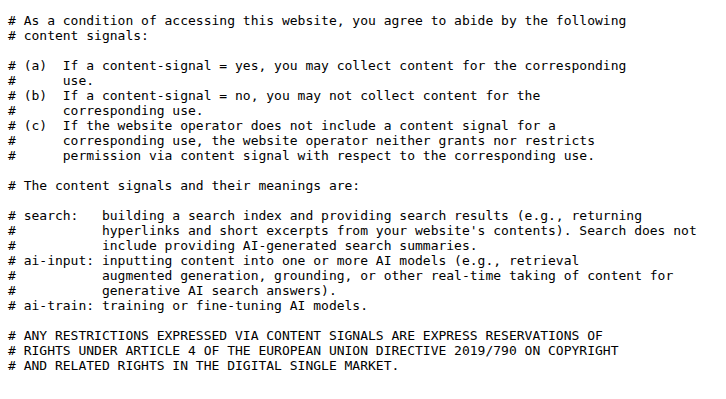
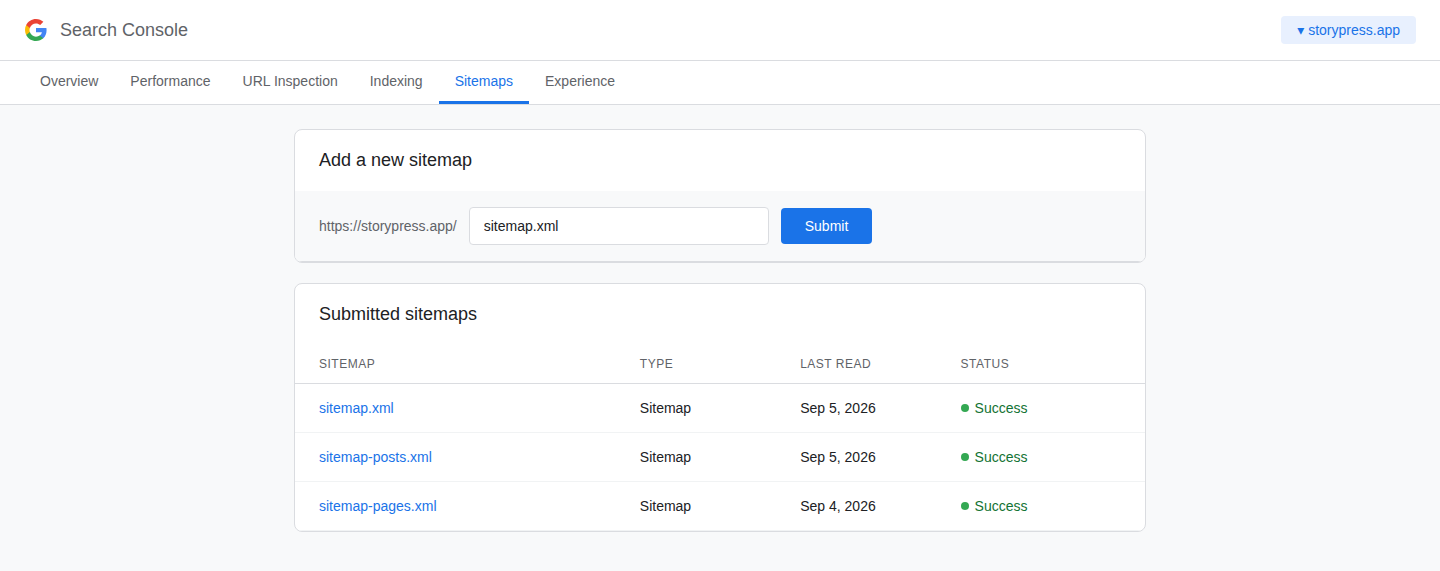
Before you check your own, here is what a healthy sitemap and robots.txt look like when you open them directly.

The 5-minute health check
Step 1: Open your sitemap
Type yourdomain.com/sitemap.xml into a browser. You want to see XML with a list of URL entries, one per page. How to verify: count a few entries and spot-check that your homepage, your services page, and a recent post are in there. Two failure modes to catch: a 404 (no sitemap at all) and our failure mode, a sitemap that loads but is empty. Both look fine from the outside.
Step 2: Open your robots.txt
Type yourdomain.com/robots.txt. The one line that should make you stop everything: Disallow: / under User-agent: *. That single slash tells every crawler to skip your whole site. It is usually a leftover from a developer hiding the site before launch, and it is more common than you would think. How to verify: you may see specific paths disallowed (an admin area, a search results page); that is normal. A bare Disallow: / for all agents is the emergency.
Step 3: Check the sitemap line inside robots.txt
Good robots.txt files end with a line like Sitemap: https://yourdomain.com/sitemap.xml. It is how crawlers that have never visited you find the map. How to verify: the URL on that line should load and should match Step 1.
Step 4: Tell Google directly
In Google Search Console (free, ten minutes to set up if you have not), open Sitemaps in the left menu, paste your sitemap URL, and submit. How to verify: status should read Success within a day or two, with a discovered-pages count that roughly matches your real page count. A big mismatch is your cue to dig.
Do this, not that
Do
Check both files twice a year, and after any redesign or migration
Keep only real, live pages in the sitemap (no redirects, no 404s)
Let your platform regenerate the sitemap automatically when you add pages
Submit the sitemap in Search Console once, then let it ride
Don't
Use robots.txt to hide private pages (it advertises them instead)
Copy robots.txt rules from random tutorials without knowing what each line blocks
Hand-edit a sitemap and forget it exists (stale maps get ignored)
Assume no error message means everything works. Empty files return 200 too
The 2026 twist: robots.txt is now read by more than Google
Search bots are no longer the only readers. AI crawlers like GPTBot (OpenAI), ClaudeBot (Anthropic), and PerplexityBot check robots.txt before touching your site, and you can now set different rules for training crawlers versus the bots that answer live user questions. For most small businesses the right move is simple: stay findable. When someone asks an AI assistant for a pottery class or a plumber in your town, you want your site in the pool of sources it can read and cite. Blocking every AI bot by default is a decision worth making deliberately, not something to inherit from a copied template.
This is also a category where your website platform should be doing the work. StoryPress generates the sitemap and robots.txt automatically and keeps pages AI-readable by default; part of why it stays at $5 a month is that there is no plugin stack to maintain or misconfigure behind those files. And when automation does slip (our empty sitemap above), the check you just learned catches it in five minutes. No tool replaces looking.
A sitemap that loads but lists nothing looks exactly like a healthy one. Check the contents, not the status code.
One practical website fix in your inbox each week

Website Not Secure? What It Means + 4 Fixes
Every browser now passes judgment on your site before a visitor reads a single word. Chrome prints Not Secure next to your address, Safari warns the connection is not private, and on a phone the warning fills the screen with a scary full-page interstitial. Visitors do not parse the technical details; they see a warning next to your business name and hit back. The cause is almost always one missing or misconfigured certificate, and the fix is usually free and done in under an hour. This guide walks the four fixes in order of likelihood, with a check to confirm each one worked.

5 Homepage Headline Formulas That Convert
Your homepage headline is read five times more than anything else on your site, and most small businesses spend it on the word Welcome. The visitor gives you a few seconds to answer one question: am I in the right place? Quality you can trust and passion for excellence do not answer it; they could hang over any storefront in any industry. Specifics answer it. This guide gives you five headline formulas that survive contact with real customers, each with a before and after from an actual business type, plus a real example page we built and screenshotted so you can see one working.