'Crawled - Currently Not Indexed': What It Really Means

Of all the statuses in Search Console, this one stings the most because nothing is technically wrong. Google found the page, fetched it, parsed it, and then declined to keep it. No error to fix, no red icon, just a quiet judgment that the page was not worth storing. Site owners burn weekends resubmitting sitemaps and tweaking settings, because it feels like a bug. It almost never is. This guide explains what the status actually means, which pages belong in that bucket on purpose, the one technical check worth running, and the content upgrade that actually moves a page out of it.
You open Google Search Console, click the Pages report, and there it is: "Crawled - currently not indexed", with a list of pages you worked hard on. No error. No warning. Just a quiet gray status that means those pages cannot show up in Google at all.
Here is what it actually means: Google's crawler visited your page, downloaded it, read it, and then decided not to add it to the index. Think of the index as a library. Google picked your book up, flipped through it, and put it back on the cart. Nothing is broken. Google simply chose not to shelve it.
That distinction matters, because it changes what "fixing it" looks like. This is usually not a technical problem you can patch in settings. At Google's Search Central event in April 2026, a presenter put it plainly: when Google crawls a page, "if we think it's useful, we might put it in a database." And with AI making content cheap to produce, the bar for *useful* has gone up. Google said it is now looking for two things: personal experience and knowledge no one else has.
So here is the honest playbook: figure out which pages in that list actually matter, run one technical check to rule out the rare real problem, and then make the pages that matter impossible to skip. Step by step below.
Where your page is stuck (and where it isn't)
Every page goes through the same three stages on its way into Google. "Crawled - currently not indexed" means you cleared the first two and stalled at the door of the third.
If your status says "Discovered - currently not indexed" instead, you are stuck at stage 1→2: Google knows the page exists but has not visited yet. Different problem, usually just patience or internal links.
Step 1: Cross out the pages that belong there
Before you fix anything, know this: a healthy site always has pages in this bucket. Some URLs are *supposed* to be crawled and not indexed, and Google filing them there is the system working.
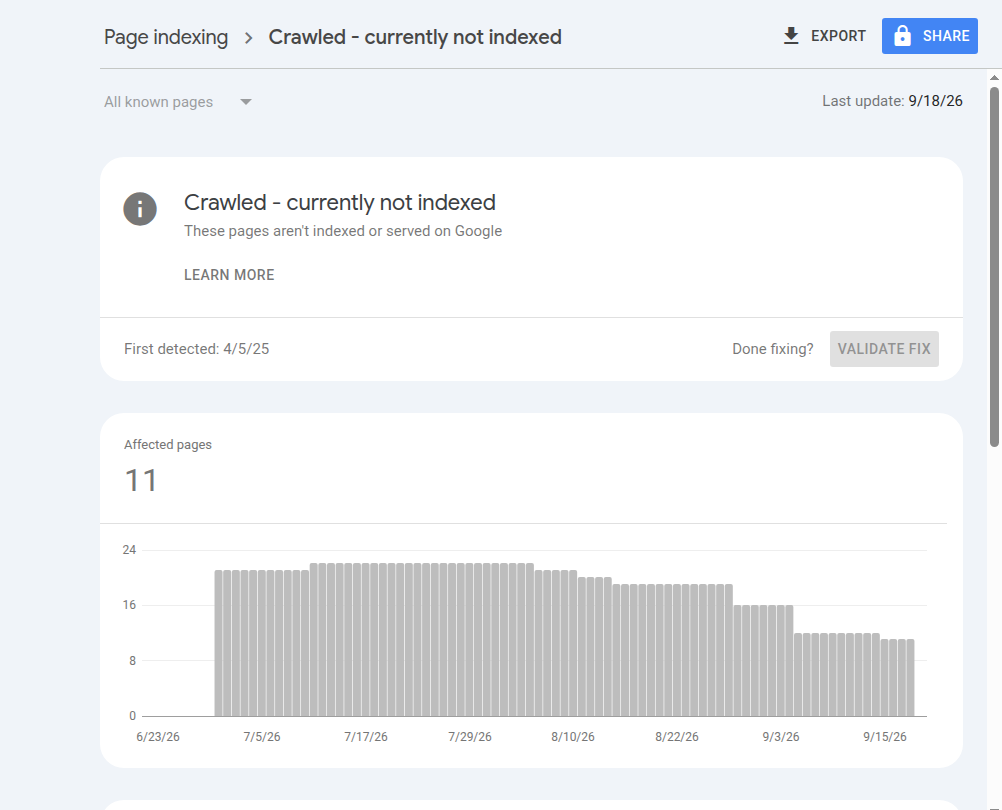
Open the report (Search Console → Indexing → Pages → "Crawled - currently not indexed") and cross out anything that looks like:
Feed and utility URLs: anything ending in /feed/, /print/, or similar
URLs with parameters: anything containing a ? like ?utm_source=... or ?replytocom=...
Tag, category, and archive pages with little unique content of their own
Old duplicates: a page you replaced but never deleted
How to verify you did it right: what remains after crossing those out should be a short list of real pages you genuinely want people to find: service pages, key blog posts, your homepage. That short list is what the rest of this guide is for. If the list is empty, close the tab. You never had a problem.
Step 2: Run the one technical check that matters
Real technical causes are rare here, but they exist, so rule them out in two minutes:
In Search Console, paste the stuck URL into the search bar at the top (this opens the URL Inspection tool).
Click Test Live URL and wait for the test to finish.
Click View Tested Page and look at the screenshot and HTML. Ask one question: *can Google see my actual content?*
If the tested page shows your headline and full text, you pass. Technical causes are now effectively off the table, and you can skip to Step 3.
If the tested page is blank or missing most of its content, you found a real bug. A common real-world example: a robots.txt rule like Disallow: /*?* (meant to block tracking URLs) that also blocks the CSS and JavaScript files a site's theme needs, so Google sees an empty shell. Sites built on heavy themes and plugin stacks hit this class of problem constantly; it is one reason we built StoryPress to serve plain, AI-readable HTML where the content is simply *there* on the page, with no scripts required to render it.
How to verify the fix worked: after correcting robots.txt or the broken theme, re-run Test Live URL. When the tested page shows your content, click Request Indexing once and move on.
Step 3: Face the real cause. Google thinks the page adds nothing
If Google can see your content and still will not index it, the page has a quality problem. Not "badly written": most stuck pages are perfectly decent. The problem is they are *interchangeable*. SEO consultant Marie Haynes, who analyzes these reports professionally, calls it commodity content: pages that restate what a thousand other pages already say. At that same 2026 event, Google admitted that if thousands have covered the exact same topic, it may decide your page is unlikely to be useful, and it even experiments: indexing a page for a while to "see which one produces happier users," then dropping it.
Here is what that looks like in practice:
Gets skipped
"5 benefits of regular HVAC maintenance" (page 4,000,001 on the topic)
A service page that only lists services by name
"What is [term]?" posts an AI could write in one prompt
Rewrites of a competitor's article in your voice
Gets indexed
"What we found inside 47 furnaces in Maplewood last winter" (with photos)
A service page with your real prices, timelines, and before/afters
The question your customers actually asked you this month, answered from experience
Anything with numbers, photos, or details only you could publish
Notice what the right column has in common: it is all things you already know and your competitors cannot copy. This is the one place a small business has an unfair advantage over content farms. You have real customers, real jobs, real photos, and real numbers. Use three of them per page and you are no longer a commodity.
Google didn't miss your page. It read it and decided the internet already had one. Publish the page only you could write.
Step 4: Upgrade one page, then request indexing
Do not try to rescue twenty pages at once. Pick the single stuck page that would bring you the most business and upgrade it:
Add first-hand specifics. One real example from a customer job, a real number ("we quoted 14 of these last month"), or a photo you took. One paragraph of real experience outweighs five paragraphs of explanation.
Answer the question the top results don't. Search your target phrase, read the top 3 results, and add the thing they all skip (usually price, timeline, or "what can go wrong").
Cut the filler. Delete any paragraph that could appear word-for-word on a competitor's site. If the page gets shorter, good.
Link to it from your homepage or a popular page. Internal links tell Google the page matters to you.
Then request indexing via URL Inspection → Request Indexing. Once. Repeatedly clicking it does nothing; Google says so in its own Page Indexing report documentation.
How to verify it worked: check the URL in URL Inspection after 1-2 weeks. The status flips to "URL is on Google" when you are in. Indexing after an upgrade commonly takes days to a few weeks; if nothing changes after a month, the page needs a bigger upgrade, not another request.
The takeaway
"Crawled - currently not indexed" is Google being honest with you. It is not punishing your site; it is telling you which pages read like everyone else's. Cross out the URLs that belong in the report, run the two-minute live test to rule out a rendering bug, and then spend your energy where it counts: making your most valuable page one that only your business could have written. That is the version of SEO that survives every algorithm update.
One practical website guide like this, every few days. No fluff.

How AI Assistants Find and Recommend Businesses (and How to Be Findable)
When someone asks ChatGPT for "a good accountant near me" or asks Claude to "find a photographer for a small wedding," the assistant answers with a shortlist. Some businesses make that shortlist. Most never do. The difference is rarely luck: it comes down to whether the assistant can find, read, and trust your website. This guide explains how AI assistants actually source their recommendations in 2026, then walks you through five checks you can run today.

Contact Forms That Get Replies
A visitor who opens your contact page has already decided you might be worth hiring. This is the warmest traffic your site gets, warmer than any ad click, and it is exactly where most small business sites spring a leak. An accountant asks for a phone number and loses the after-hours browser. A contractor demands a project budget before a first conversation. A studio hides the form under a wall of office details nobody came for. Each choice feels harmless and each one turns real prospects away silently. This guide walks through the five decisions that separate forms people submit from forms people abandon.